
This guest post by Graham was originally published on the Clarify blog on 18 June 2015.
 The last time I moved, it was horrible. After days of packing, hours of driving, and days of unpacking, it was impossible to remember what was where. We went days trying to find which box had that thing and in some cases, we gave up and bought a new one just to find it days later.
This move was going to be different.
Not only were we going to be better organized, but I decided to put a few tools to work. I knew that there would be two things that would not be misplaced no matter what: my phone and the dog. Since the dog didn’t volunteer to help, I opted to use the phone.
My Idea
My first idea was to simply use Twilio as a voice recorder, get the transcripts, and email the results so I’d have a list of everything in each box. That code was similar to the Voicemail Twimlet which seemed both too complex and too simple at the same time.
My second – and ultimately final – idea was to use my employer – Clarify – to take the voice recordings and make them searchable.
So meet MoveApp:
My flow was relatively simple:
First, I label all my boxes 1, 2, 3…
Then, I call my Twilio number
It prompts me for the box number which I type in and press #
Then as I packed things, I simply said what it is.
(Behind the scenes, Twilio sends the recording to Clarify which does its processing.)
- Whenever I’m looking for something, I can send MoveApp a text message and it responds with a box number. It doesn’t get much simpler.
Building MoveApp
From a technical point of view, this is what the process looks like:
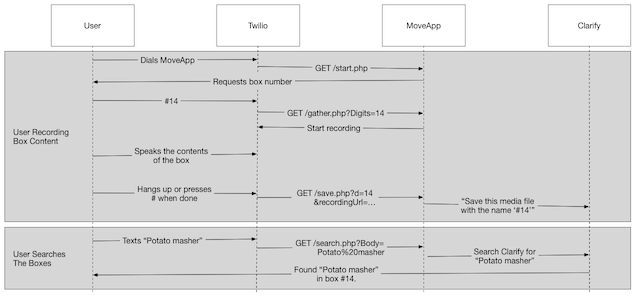
This looks like a lot of moving parts, but there are only four scripts that matter. You can follow along from my Github repository but here are the details.
The first script – start.php – receives the incoming call and prompts the user for a box number:
php <br/
require 'config.php';

echo xml();

?>

    Please enter the number of the box you are packing. When you are

         done, press pound. We will keep all recordings of each box number.
The second script – gather.php – receives the box number, starts the recording, and sets the action callback. The action callback is the most important part. This will make sure that once the recording is done on the Twilio side, the recording URL will be sent to the next script.
php <br/
require 'config.php';

$digit = (int)$_REQUEST['Digits'];

xml();

?>

  Recording contents for box number

  php echo $digit; ?.

  Press pound when you're done.

  timeout="3600"

  finishOnKey="#"

  action="php echo $config['webroot']; ?save.php?d=php echo $digit; ?">
Note: By default, this will allow a recording of up to 3600 seconds (60 minutes) and only stop when you hang up or hit the # sign. Don’t forget to speak clearly!
The third script – save.php – catches the recording URL and the box number and submits it to Clarify for processing:
php <br/
require 'config.php';

$number = (int)$_GET['d'];

$url = $_POST['RecordingUrl'];

if (filter_var($url, FILTER_VALIDATE_URL) === false) {

  echo xml();

  echo '<Response><Say>Invalid URL.</Say></Response>';

  die();

}

$clarify->saveBoxIDWithMedia($number, $url);

echo xml();

?>

  php echo $config['webroot'] ?start.php
Note: Clarify will take roughly one minute of processing for every minute of audio. Since this only happens once, it’s not an issue.
The final script – search.php – receives the incoming text message, submits the search to Clarify, processes the results and responds with a simple text:
php <br/
require 'config.php';

$query = preg_replace("/[^A-Za-z ]/", "", $_REQUEST['Body']);

$names = $clarify->searchForBoxes($query);

if (count($names) > 0) {

  $about = implode($names, ', ');

} else {

  $about = '0 boxes';

}

echo xml();

?>

  We found "php echo htmlspecialchars($query); ?" in php echo htmlspecialchars($about); ?.
The Results
 I’m happy to say that I used this for my move last month. While there were still a lot of complexities with moving, the application worked flawlessly, and it turns out that I didn’t need to be that organized. After the move, finding everything was faster and easier than I could have imagined.
You can get and deploy all the code from my Github repository or just click the “Deploy to Heroku” button on that page, fill in your Clarify credentials, and then set your Twilio voice and SMS urls to point at the app. It will be the easiest part of your move.