
TLDR: After Scott Adams died on January 13, 2026, I decided to restore his blog having no clue what I was getting into. In 6.5 days, I restored 1913 blog posts from the Wayback Machine – including topic tags, many images, and links – using a combination of scripting, AI, and APIs to extract, clean up, and restore the posts without modifying the words written. You can check out the site at ScottAdamsSaid.com
ScottAdamsSaid: The Long Version
On January 13, 2026, Scott Adams died of pancreatic cancer. While he started his public career and was best known for Dilbert, he was also a prolific writer on psychology, persuasion, and more. I found his blog in late 2015 just as I was deep in my own psychology and persuasion reading, so I devoured huge sections of his blog over a few weeks. It was both meticulous in analysis and often correct in conclusions. Not long later, he switched to daily live streams and the site quietly disappeared.
Just before his death, I realized his site had disappeared. He stopped posting long form posts in 2016 and stopped completely in mid 2019. On the day of his death, I thought it’d be great to find and restore the site and based on his Twitter/X handle – @ScottAdamsSays – I thought the name was obvious and was stunned to find the dot com available. Since I had been laid off the week before, I had some free time anyway.
So then – like any good engineer – I started by defining the problem:
Step 1: Define the Problem
Initially, my goal was “load Scott’s blog, don’t edit his words.” It was simple, concrete, and well-bounded. I thought.
But – like any good engineer – I was grossly underestimating the problem.
Step 2: Define a Solution
I started in web development in 1996 and launched, moved, and converted more sites than I care to consider, so I sketched out a rough flow on my home office whiteboard:
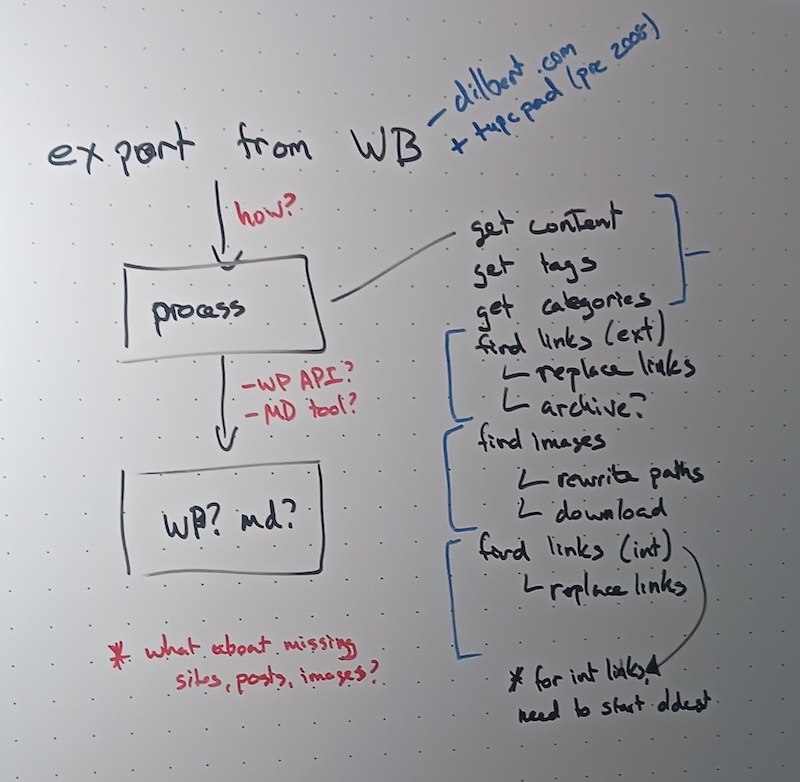
My whiteboard standard – because yes, I have a standard – is that actions or steps are black, logical components are blue, and open questions are red. This left the open questions of:
- How do I get an export from the Wayback Machine?
- How do I store the resulting pages?
- How can I identify and resolve missing images, websites, urls, posts, etc?
Also, I initially only set out to import dilbert.com but someone on Twitter/X reminded me there was a previous blog that I had to dig into.
Step 3: Set the Rules
Along the way, I decided to set some rules for myself. While it would be easy to correct typos – and I really wanted to – I realized that if Scott didn’t care to go back and fix it, it was not my job to do so.
Then I opted for tagging problems like missing images or broken urls instead of trying to clean them up on the fly. Specifically, I’d rather go for completeness instead of correctness, especially since I knew some of the sites would be gone and there wasn’t a “good” option.
Step 4: Choose my Tools
As an experiment, I pulled up Scott’s site in the Wayback Machine to see if I could just copy and paste. At first glance, I found hundreds of posts so that wasn’t going to work Thanks to a tip from my friend and colleague James Higginbotham, I played with creative wget options but that didn’t quite work. Then I found the Wayback Machine API and knew someone had probably built something useful and sure enough, there was the Wayback Machine Downloader.
Warning: While I initially thought the Downloader worked well, after some QC checks, I found it missed about 100 posts. They were in two groups and sequential so I suspect it missed a particular timestamp to export against but I haven’t dug into it.
On the other side, I needed to decide where to put the files. While Markdown would have been more flexible long term, I was going for speed so WordPress it was. Since it has a simple API, I could do the other critical thing.
The final tool was all the processing in the middle. While I could do some creative regular expressions in the middle, I was moving for speed, so I went with Claude. I worked with it heavily in my LinkedIn Learning courses, so the challenge would be giving context and instructions, not figuring out the tool.
Step 4: ETL – Extract, Transform, Load
Firing up the Wayback Machine Downloader with the simplest config:
ruby wayback_machine_downloader https://blog.dilbert.comAnd many.. many.. hours later, I had all 10,489 files downloaded.
Then I backed up that entire directory structure, trimmed out the irrelevant files (js, css, etc), and noise to get down to the individual per-post index.html files and passed them each to Claude with this directive:
You are my careful assistant helping me copy pages of text. I did not write the text so we cannot change any words, fix typos, or change formatting.

Each page of text will have a title, a body, and a published date. It may also have descriptive tags. If you find urls in the text, add a category called "To Cleanup" so we know to fix it later.

Return the resulting title, body, published date, tags, and category.
Then I was going to load posts into WordPress and be done. Woohoo.
This did not work. This did not work in the most spectacular ways.
If you’ve never looked at the source of a webpage, you don’t see the problem, but I should have. Once you look at the source, you realize that EVERY page has urls in the form of Javascript, css, and more. Therefore, EVERY page was tagged for a cleanup. Arg.
After lots of experimentation, I rewrote the middle section; changing it to this made all the difference:
Each page of text will have a title, a body, and a published date. It may also have descriptive tags. In the body, remove any html markup not related to formatting, images, video, or links. If you find urls in the text, add a category called "To Cleanup" so we know to fix it later.Then I added the WordPress OpenAPI spec and changed the last line to:
Now use the resulting title, body, published date, tags, and category to create a new post using the WordPress API.Each iteration of this experimentation let me load 50-100 posts at a time. It was progress but I was getting annoyed because after four days, I’d loaded roughly 700 posts and someone had pointed me to his older Typepad blog which included over 24,000 files.
Note: There’s another subtle issue in here. When someone writes, they quite often refer to their previous posts. Since my approach was date-agnostic, I couldn’t rewrite internal links because the target post may not exist when I needed it to.
As of early on the 17th, I had imported ~700 posts. Over the following 48 hours, I added another 500 so I was accelerating but still had 3-4 days left. Since the end was in sight, I started thinking about cleanup, and then I realized my mistake.
Step 5: WordPress as a State Machine
Since I hadn’t been specific on what type of cleanup a post needed, I couldn’t separate “this has a missing image” from “this needs a youtube embed.”
But since I had WordPress as my backend, I had an idea. I created more Categories – Missing Images, Book Links, Internal Links, Make New Links, Missing Sites – and reloaded Claude with some new instructions:
Using the WordPress API, retrieve 25 posts in the "To Cleanup" category and examine the body of the post and find any links.

If there's exactly one link and it's to Youtube.com, create a Youtube embed block using that link, remove the "To Cleanup" category, and update the post with the new body and category list.

If all of the links include "blog.dilbert.com", remove the "To Cleanup" category, add the "Internal Links" category, and update the post with the new category list.

If any of the links include domains other than "blog.dilbert.com", add the Category "Make New Links" and update the post with the new category list.

If there are any img html tags, add the Category "Missing Images" and save the post with the new category list.
I could have done most of the above with simple string detection in a loop but I was going for speed and didn’t want to spend time in code.
This brought down my “To Cleanup” list from 987 down to 450. Then I got more specific:
Using the WordPress API, retrieve 25 posts in the "Internal Links" and extract the links.

For each link, use the link slug and search WordPress for a similar slug.

Present the sentence the link was in, the extract slug, and the links from your search.
After checking the context on those, I manually fixed the handful where a search failed and let this update the remaining, removing them from the “Internal Links” Category.
Note: This is one of the warnings that I’d missed some posts at export. More importantly, since I had a specific post, I started a new export and then pulled in the Next and Previous to check for those. If I had them, I stopped that direction. If not, I went that direction again. This recovered 114 posts I missed the first time.
Step 6: Final Cleanup
I used a handful of other instructions to slice off bits of the “To Cleanup” category, but it’s painful as the issues are smaller, more specific, and more subtle, requiring more effort and resulting in smaller batches to fix.
After all of the above and some quality control checks, I got it down to 2 posts that are linked but I can’t find any archive of and another 193 that are missing at least one image. With a little more digging I found most of those missing images were a handful of patterns, so managed to trim that down to 52 posts. Some of those images may be availble in the Wayback Machine and I just haven’t found them but they’re not critical at the moment.
Next Steps
Many people have asked if I’m going to pull in his Periscopes, Youtube videos (and transcripts), or Twitter archives. At this point, no. I do not have the time, storage, or money to take on such a project, but if someone has storage to share and willing to fund a speech to text effort, I could consider it.
Now that the content is in place, I’ve applied a basic theme. I’m trying to keep it lightweight and content focused but open minded on finding something better.
Finally, with the posts restored, I’m going to pull together his collections according to his own descriptions and tagging. Scott’s writing on persuasion and framing are high on that list but I suspect there are other compelling series hidden in there.
What did I learn?
In terms of final counts: 2028 posts (1914 were restored in the first 6 days), AI did the bulk of the transformation, loading, and cleanup. I wrote a lot of context and directions (some included above) but zero lines of code. I was super suprised by that. But I don’t think a full non-developer could have done this as quickly or easily as I had a ton of my own context and understanding that I brought to the project.
I’ve used Claude, Copilot, and others for code generation for my LinkedIn course on SDKs, but this was the first time I’ve used an AI for a non-code, non-agentic project from beginning to end. Granted, I had a simple use case in that this isn’t an app, I don’t have to worry about malicious users or input, and the underlying plumbing is WordPress so I could skip a ton of things but odds are, that’s what most AI projects look like right now.
You can check out the site at ScottAdamsSaid.com
Note: I did this without the permission of either Scott or his estate. If the estate wishes me to remove the site, please contact me, and I will transfer ownership without hesitation.